I recently took a month-long trip to Europe. Before the trip, I wrote about my intention to leave my iPad behind (a first!) and travel only with my iPhone. However, I failed to mention another piece of technology I planned to take: my Apple Watch. While I didn’t give it much thought at the time, it turned out to be a wonderful, and useful, travel companion.
The New Watch
I’ve been wearing a watch since I was a kid, and have had many (many!) different watches over the years. In recent years though, I’ve been exclusively wearing an Apple Watch.
I had been using an Apple Watch Series 6 since it was released. It worked well and did everything I needed, so I had no intention of replacing it. However, lately, I noticed that on many days, the watch’s battery would be depleted by early evening. The settings app indicated that the battery was “significantly degraded” and needed to be replaced. I didn’t want to spend $100 to replace the battery on a watch that was several generations old, so I decided to spring for the new Series 9. That is what accompanied me on this trip.
Information On My Wrist
I usually pick one or two watch faces that I like and that’s it. I leave them alone. However, for this trip, I decided to make sure I had important travel information easily accessible on my watch. That way, I wouldn’t need to pull my phone out as much. To achieve this, I added two new watch faces focused on travel.
Airport Watch Face
For me, travel days are stressful. There is a lot going on and a lot of information to keep track of. Flight numbers, gate information, boarding time, departure time, gate changes, boarding pass, and even seat assignments, are all things I need quick access to. When I’m rushed and stressed, I often forget even simple information, such as the gate, which means I’ll need to look it up on my phone.
To help with this, I created a watch face dedicated to the days I’d be in an airport traveling. It worked really well. Here’s the watch face:
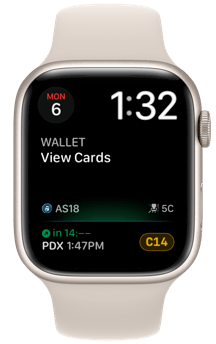
At the top is just the date and time, which seemed like a good idea.
Next up is the wallet. On travel days, my boarding pass is automatically the first thing in the wallet, so a quick tap here brings that up. Super easy.
At the bottom is a complication from an app called Flighty. If you travel a lot, I can’t recommend this app enough. It’s a bit pricey, but it provides real-time flight information in a beautiful, well-integrated user interface. It also sends notifications if a gate changes or your flight is delayed, often before the airline does.
This complication shows me:
- The flight number
- My seat assignment
- The departure time
- The gate
A simple tap on the complication opens the app on the watch, which provides additional information if needed.
This watch face worked so well that I wish I had done it much sooner. It saved me time, and best of all, it kept me informed with no effort on my part.
Away From Home Watch Face
On days when I’m away, but not in an airport, I like to have other types of information readily available. I set up a different watch face to use for this. While it’s busy, all the information is useful.
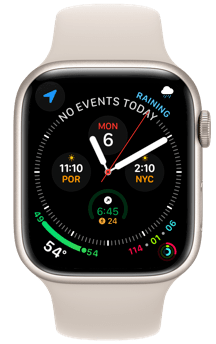
- Times: I added the time zones for my family so I can make sure it’s a good time to call or text. It’s really nice to have this at a glance.
- Calendar: Often times I will have booked spots at museums or restaurants in advance, and it’s great to easily see where I’m headed next.
- Maps: I added a link to Maps so I have quick access to directions, which I discuss below.
- Weather: Having the rain forecast close at hand makes it easy to determine if I need to quickly change plans to be inside. I actually did this a few times on this trip.
- Fitness: I do a lot of walking while on trips such as this, and like to track my fitness rings. It’s pretty easy to close both the Move and Exercise rings when walking all day, but I like being able to see my progress.
Phone in the Pocket
When I’m in a crowded place, I don’t like to have my phone in my hands. I’ve read several reports of people having their phone swiped by thieves, and I would rather not be a victim. I also don’t want to look too much like a tourist by staring at my phone while trying to find my way around.
Luckily, in addition to information on the watch face, there are apps that work really well on the Apple Watch that make it possible to leave my phone in my pocket.
Directions
On this trip, I often needed walking directions, and the Apple Watch worked really well for this. I could add the destination directly from the watch or on the iPhone. Then, a quick lift of my wrist would let me see the route and my location, and I would get taps on the wrist for upcoming turns. I was able to keep my iPhone in my pocket and not worry about looking lost or having it stolen.
I hadn’t really used this feature much in the past, and I was very impressed. The watch’s screen was big enough to show a good portion of the route along with street names, and it kept up with my location very well.
This was probably my favorite use of the Apple Watch on this trip. I used maps almost every day, and it made it super easy to find my way.
Payments
I love using Apple Pay, especially with my Apple Watch. There is no need to get my phone out, and it’s quick, easy, and secure.
In Europe, tap to pay is seemingly everywhere. I don’t recall ever having to get my credit card out. Restaurants bring the payment terminal to the table, and museums, gas stations, train stations, and shops all had tap to pay terminals. They all worked great with Apple Pay.
While this was another reason I was able to keep my phone in my pocket, I discovered another benefit to Apple Pay in Europe. When using a physical credit card, even one with tap to pay, there appears to be a limit on the amount you can charge before having to insert the card, or sign the receipt. One of my travel companions did not use Apple Pay, but did have a tap to pay credit card, and often had to sign the receipt or insert his card in the machine. I never had to do either.
Every Day
The Apple Watch is a great travel companion, and I used it even more than I expected on this trip. That said, all the things I mention above are also great in everyday life. I find myself looking for even more ways to take advantage of this tiny computer on my wrist.
I recently read Jason’s post about going without his Apple Watch for a week, and I’m tempted to give that a try, just to see how it feels to go “old school.” But given how useful the Apple Watch is for me, I might have a hard time letting go.
What about you? What features of the Apple Watch do you use most?
 Words from Rob
Really enjoyed this article Rob.
I agree that the Apple watch is a great travel companion. I too love using it for walking directions instead of the phone in busy cities. As you said, I just feel safer and less like a tourist this way.
The themed travel watch faces were a brilliant idea, I need to do this on my next trip!
I’m curious on two things regarding your new Series 9. Did it’s battery hold up to a full day of rigorous use while you were on vacation? Also have you used the new “pinch to select feature” that is exclusive to the Series 9 and Ultra 2 and if so, how useful is it in day to day operations?
As far as my favorite features of the Apple Watch, it’s easily the activity tracking first, followed by how it allows me to look at my phone less second. One small thing that I use several times every day is timers on my watch. I have the timer app as one of my complications and it is so convenient!
I also have wore watches since I was a kid in elementary school. I started with a cheap Timex watch, and from there I moved on to several Casio G-Shock watches. I still love the design of Casio’s watches today. After the G-Shocks, I moved to a Pebble smart watch which I wore until the Apple Watch came out. I preordered the original model and have had an Apple Watch on my wrist ever since.
LikeLiked by 2 people
Thanks, Brandon.
The battery held up really well, better than I thought it would. I used maps almost every day and never had an issue. I was impressed.
Unfortunately I did not have a chance to use the new “double tap.” That came out in watchOS 10.1 while I was on the trip, and I didn’t want to update my watch while traveling. I have used it a couple times since being home and it’s nice. But, I don’t feel that I’ve had enough time to really gauge how useful it is yet. I’ll definitely keep using it to see what I think.
I also had a bunch of different Casio watches in the past and really liked them. I even had one called the Casio Melody Alarm in the late 70s that could play several different songs. I drove everyone crazy with that one, but I thought it was so cool!
Thanks for reading and the comment.
LikeLiked by 2 people
Thanks for the reply Rob. That’s great news on the battery life. Sounds like it can handle about anything you throw at it.
I looked up the Casio Melody Alarm on YouTube. Wow, that is an awesome watch. You were on the cutting edge!
LikeLiked by 2 people
Nice post, Rob. I like how clearly you share examples of things. Your mention of battery health in settings on the Watch led me to check my Watch SE 2020: it’s at 82% health. So my recent battery degradation does seem directly tied to watchOS 10, which Apple may be fixing soon.
I’m still experimenting off and on. I’ve been leaving my watch on the charger days at a time. And sometimes I’ll wear it, like today at work. I’m seeing if I miss it much when absent, or if I really appreciate it more when present. More than anything, it just feels normal to have a strap around my wrist. My number one use for the watch seems to be for the current time – crazy! 😉 My watch face now is still in simple old-school digital watch mode.
The number two feature I miss when not wearing the Watch so far is not the temperature complication, to my surprise. It’s the lack of Messages notifications on my wrist. I’m surprised by how often I feel like I might have missed a text since my watch didn’t tap my wrist.
Activity tracking is probably in 3rd place. I also like the convenience of timers. And probably the only time I ever truly rely on Siri is when I say to my Watch, “Remind me to…” and it just works, adding a spontaneous to-do in Reminders.
All that said, I’ve been fine without the Watch on days I leave it off. Everything my watch can do (except fitness), my phone can also do. It just makes me think more about wearing a Timex or Casio “dumb” watch. If I stick with Apple Watch, I’d look forward to a much bigger display. I have the small 40mm case; I’d go up to 45mm with edge-to-edge (and always-on) display. I’m still unsure if I feel like the Watch plus my phone is too much tech for my addled brain. I’ve had a lot going on lately. Maybe when my schedule slows down.
It’s nice you were able to upgrade to Series 9 for your trip. Was it noticeably faster?
You’re right about how handy Maps directions are on your wrist. I have really liked using Maps directions that way when driving far away. Even on the small SE display, I can quickly glance at my wrist by the steering wheel (rotating a little to wake the display) and really feel the haptic taps when a turn approaches. It’s a bit more convenient than checking the phone GPS tracking.
On payments, it’s still surprising how far behind the USA is compared to overseas with tap-to-pay. Some big cos here (e.g. Walmart) just don’t want to accept Apple Pay either. On recent days without my Watch on, I still use my iPhone for tap-to-pay and love how convenient it is when available. It’s cool using the watch for that, but I sometimes feel awkward hovering my wrist over the pay terminal, hinting for the sweet spot. “I’m using it wrong.” 🤷🏻♂️
LikeLiked by 2 people
Thanks, Jason. I have been using simple, analog-type watch faces recently (other than traveling) and really like it. I guess it’s half-way between “old school” and “new school.”
I also use timers quite often and use Siri for reminders all the time. You mention screen size, and I was surprised by how noticeable the larger screen compared to my series 6 was. I didn’t expect that to be something I cared about, but it’s nice. I can even have an on-screen keyboard now!
The series 9 is nice, but honestly I don’t really notice much speed difference in overall watch operation (selecting, scrolling, etc.). Siri does seem faster for adding reminders and controlling home kit devices, which I like. Maybe if I still had my old one to compare against it would be more obvious.
I look forward reading more about your watch journey. While the simple watches are compelling, it’s a tough choice!
Thanks for reading and the comment.
LikeLiked by 1 person
Jason, you may want to reconsider the practice of leaving the watch on the charger when not in use, especially if it’s being kept at 100%. One of the things I’ve read is that one of the leading causes of battery degradation is batteries left on chargers at 100%. In terms of maximizing the life of a battery the optimal charge level is 80% or less. Apple tries to do optimized charging by keeping devices left on chargers overnight at 80% until just before the pattern shows a use gets up and starts using the device. I’ve read complaints about this and many turn it off because sometimes the timing is off and the phone/device is not fully charged.
In any case, you might consider just turning the watch off and leaving it off the charger until you want to wear it.
LikeLiked by 2 people
Hey, thanks for that tip. It’s a good point. I think I will indeed turn it off unless I’m wearing it.
Also, I might buy a Casio watch today that doesn’t even need a charger.
LikeLiked by 1 person
Good advice! My new watch started doing the optimized charging, which I was happy about. But, as you mention, the other day it was only charged to 80% when I took it off the charger. It was fine as I didn’t do a lot that day. It hasn’t done that since the updated to 10.1.1, so maybe it was a bug. I’ll have to keep an eye on this.
LikeLike
I’m still on the Series 4. I hadn’t thought to check the battery health, it’s at 75% and suggests service. I’ll keep using it til the battery is dead. I usually put it on the charger in the morning and evening. I wear during day for health tracking and night for sleep tracking. For me the point of it is mostly health tracking. I check for time, weather and message alerts as well. But it’s the health tracking that keeps me using it.
I’d like to get another year or two out of it. I don’t mind putting it on the charger. I can do that 3 times a day without considering it an inconvenience as the charger is always within reach.
I appreciate that it’s such a powerful device for being so small. And that it runs so many apps for those that use them – pretty amazing really. I could see it replacing the phone for many but for me the iPhone is my camera so I’ll always keep one around. In general I appreciate that the Apple device ecosystem seems to fill so many needs and that the devices all work together so well.
LikeLiked by 2 people
I would have loved to have gotten another couple years out of my series 6 as well. Unfortunately, my use cases often mean that I’m not able to charge it during the day like you do. That would make a big difference!
Health tracking is big for me, too. I was wearing mine at night as well until the battery stopped making through the day. I have not started doing that again with the new one. I’m not really missing the sleep data at this point, though maybe with the new temperature sensing I’d get other, meaningful information.
Thanks for reading.
LikeLiked by 1 person